
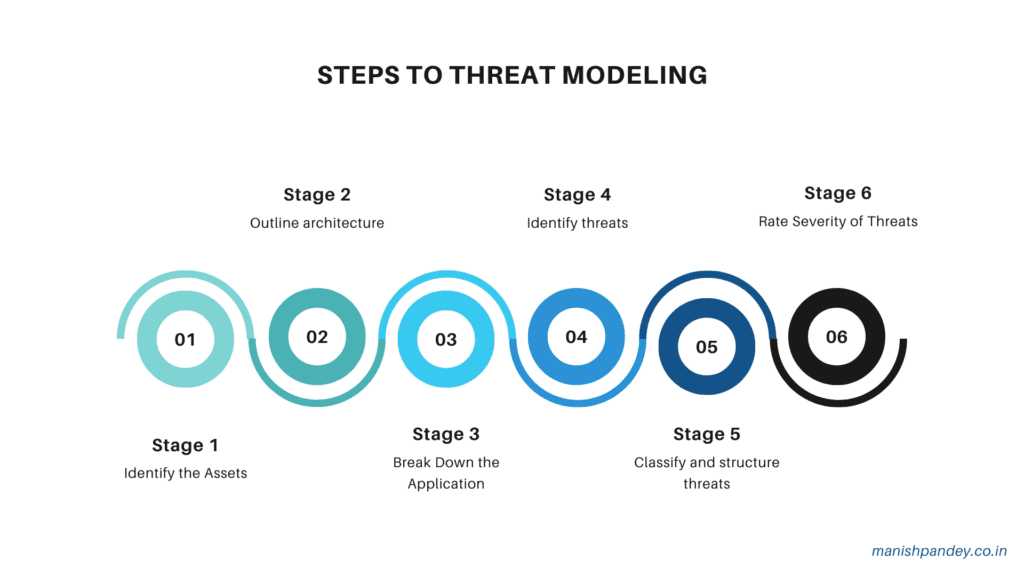
1. Overview of Threat Modeling
Historical Context
Threat modeling, as a discipline, has its roots in the early days of computer security. Initially, security efforts were largely reactive, focusing on responding to incidents after they occurred. However, as information systems became more complex and interconnected, the need for a proactive approach to security became evident. Early threat modeling efforts were informal and ad-hoc, relying heavily on the intuition and experience of security professionals.
The formalization of threat modeling began in the late 1990s and early 2000s, driven by the increasing sophistication of cyber threats and the realization that security needed to be integrated into the software development lifecycle. This period saw the introduction of structured methodologies and frameworks designed to systematically identify and mitigate potential threats.
Evolution of Threat Modeling Practices
Threat modeling practices have evolved significantly over the past two decades, driven by advancements in technology and changes in the threat landscape. Key milestones in this evolution include:
- Introduction of Methodologies: The development of structured methodologies like STRIDE (Spoofing, Tampering, Repudiation, Information Disclosure, Denial of Service, and Elevation of Privilege) by Microsoft in the early 2000s marked a significant step forward. These methodologies provided a systematic way to identify and categorize threats.
- Integration with Development Processes: The rise of agile and DevOps practices highlighted the need for integrating threat modeling into the development process. This led to the development of lightweight and iterative threat modeling approaches that fit well with these methodologies.
- Automation and Tooling: The increasing complexity of systems and the speed of development cycles necessitated the use of automated tools. Modern threat modeling tools not only help in identifying threats but also integrate with other development and security tools to provide a seamless security workflow.
- Focus on Specific Domains: As different industries and technologies emerged, threat modeling practices began to specialize. For example, specific methodologies and tools were developed for cloud environments, IoT devices, and large-scale enterprise systems.
Key Concepts and Terminologies
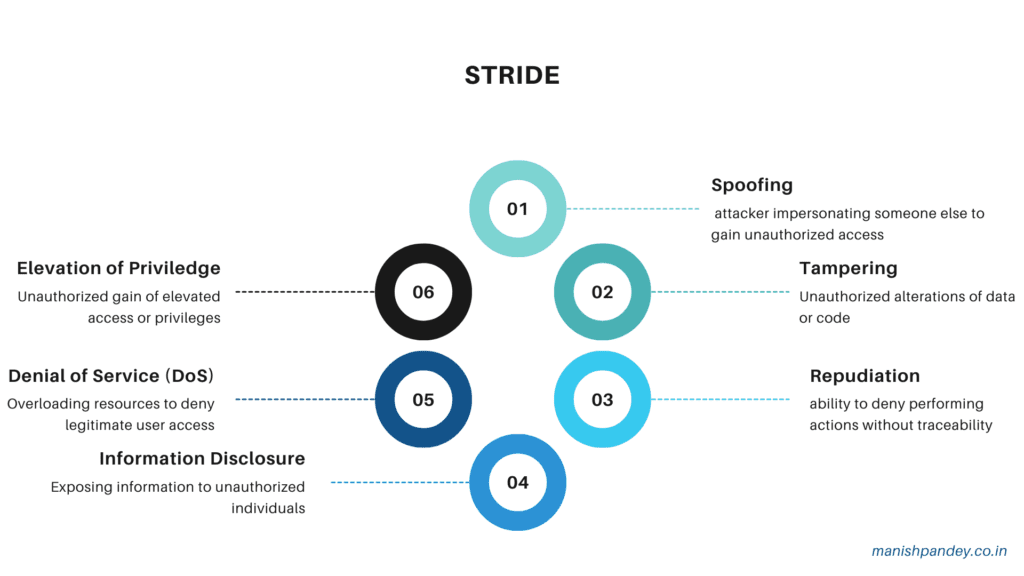
Understanding threat modeling requires familiarity with several key concepts and terminologies:
- Assets: Anything of value that needs protection, such as data, hardware, software, and intellectual property.
- Threats: Potential negative events that could exploit vulnerabilities to cause harm to assets. Threats can be intentional (e.g., cyber attacks) or accidental (e.g., natural disasters).
- Vulnerabilities: Weaknesses or flaws in a system that can be exploited by threats to cause harm.
- Attack Vectors: The paths or methods used by threats to exploit vulnerabilities. Examples include phishing emails, malware, and social engineering attacks.
- Risk: The potential for loss or damage when a threat exploits a vulnerability. Risk is typically assessed in terms of its likelihood and impact.
- Mitigations: Measures taken to reduce the likelihood or impact of threats. These can include technical controls, such as firewalls and encryption, as well as non-technical measures, such as policies and training.
- Threat Actors: Entities that pose threats, which can include individuals, groups, organizations, or natural events.
- Data Flow Diagrams (DFDs): Visual representations of how data moves through a system, often used in threat modeling to identify potential points of attack.
- Security Controls: Safeguards or countermeasures put in place to reduce risk. These can be preventive, detective, or corrective in nature.
- Scenarios: Hypothetical situations used to explore how threats might exploit vulnerabilities to cause harm. Scenarios help in understanding the potential impact of threats and the effectiveness of mitigations.
By understanding these key concepts and the historical evolution of threat modeling practices, stakeholders can better appreciate the importance of a structured and proactive approach to identifying and mitigating security threats.
2. Benefits of Using Tools in Threat Modeling
Enhancing Accuracy and Efficiency
One of the primary benefits of using tools in threat modeling is the enhancement of accuracy and efficiency. Manual threat modeling can be time-consuming and prone to human error, especially when dealing with complex systems. Tools help automate many aspects of the threat modeling process, ensuring a more thorough and precise identification of threats and vulnerabilities. These tools often come with pre-defined threat libraries, automated analysis features, and visualization capabilities, which help in identifying and assessing threats more accurately and quickly. This automation allows security professionals to focus on more strategic aspects of threat modeling, improving the overall effectiveness of the process.
Standardizing the Threat Modeling Process
Standardization is another significant advantage provided by threat modeling tools. Different teams and individuals might approach threat modeling in varying ways, leading to inconsistencies and gaps in threat identification and mitigation. Tools help establish a consistent methodology and framework for threat modeling across the organization. By using standardized templates, threat libraries, and assessment criteria, tools ensure that all aspects of the system are evaluated uniformly. This standardization not only improves the reliability of threat models but also makes it easier to compare and integrate models from different projects or teams, enhancing the overall security posture of the organization.
Facilitating Collaboration among Teams
Effective threat modeling requires collaboration among various stakeholders, including developers, security professionals, and business analysts. Tools facilitate this collaboration by providing a centralized platform where all team members can contribute to and review threat models. Features such as shared workspaces, version control, and commenting enable real-time collaboration and communication. This collaborative approach ensures that diverse perspectives are considered, leading to more comprehensive threat models. Additionally, by making threat models accessible to all relevant stakeholders, tools help bridge the gap between security and development teams, fostering a security-first mindset throughout the organization.
Integrating with Development Pipelines
In modern development environments, especially those following agile or DevSecOps methodologies, integrating security into the development pipeline is crucial. Threat modeling tools often come with integration capabilities that allow them to seamlessly fit into existing development workflows. These tools can integrate with popular development platforms, issue tracking systems, and CI/CD pipelines, ensuring that threat modeling is an integral part of the development process. This integration enables continuous threat modeling, where threats are identified and addressed iteratively as the system evolves. By embedding threat modeling into the development lifecycle, organizations can ensure that security considerations are addressed early and continuously, reducing the likelihood of vulnerabilities and enhancing the overall security of the final product.
By leveraging the benefits of accuracy, standardization, collaboration, and integration, threat modeling tools play a critical role in enhancing the effectiveness and efficiency of the threat modeling process. These tools help organizations build more secure systems by proactively identifying and mitigating potential threats, ultimately contributing to a stronger security posture.
3. Key Features of Effective Threat Modeling Tools
- Ease of Use and User Interface
- An effective threat modeling tool must be user-friendly, with an intuitive interface that simplifies the process of creating, analyzing, and managing threat models. Key aspects include:
- User-Friendly Design: A well-designed interface that allows users to easily navigate through the tool, minimizing the learning curve for new users.
- Visual Representation: Clear and comprehensive visualizations, such as data flow diagrams (DFDs) and attack trees, which help users understand complex threat scenarios at a glance.
- Guided Workflows: Step-by-step guides and templates that assist users in performing threat modeling tasks systematically, ensuring that no critical steps are overlooked.
- Customization and Flexibility
- Customization and flexibility are crucial for a threat modeling tool to adapt to the unique needs of different organizations and projects. Important features include:
- Custom Threat Libraries: The ability to create and modify threat libraries tailored to specific environments, industries, or regulatory requirements.
- Configurable Templates: Customizable templates for different types of threat models, allowing users to standardize their processes while accommodating unique project requirements.
- Adaptable Methodologies: Support for various threat modeling methodologies, enabling users to choose or combine approaches that best fit their needs.
- Integration with Other Security Tools
- Effective threat modeling tools should integrate seamlessly with other security and development tools to provide a cohesive security workflow. Key integration points include:
- Development Platforms: Integration with popular development environments and version control systems, such as GitHub, GitLab, and Bitbucket, to embed threat modeling into the development lifecycle.
- CI/CD Pipelines: Compatibility with continuous integration and continuous deployment (CI/CD) tools, allowing for automated threat modeling as part of the build and deployment process.
- Security Tools: Interoperability with other security tools, such as vulnerability scanners, SIEM systems, and risk management platforms, to create a unified security ecosystem.
- Reporting and Documentation Capabilities
- Robust reporting and documentation capabilities are essential for tracking progress, ensuring compliance, and communicating findings. Effective threat modeling tools should offer:
- Comprehensive Reports: Detailed and customizable reports that provide insights into identified threats, vulnerabilities, and mitigation strategies.
- Export Options: The ability to export reports and diagrams in various formats (e.g., PDF, Word, Excel) for easy sharing and integration into broader documentation.
- Audit Trails: Features to maintain an audit trail of changes and updates to threat models, ensuring transparency and accountability.
- Support for Various Frameworks and Methodologies
- An effective threat modeling tool should support a wide range of frameworks and methodologies, catering to different security practices and industry standards. This includes:
- Popular Methodologies: Built-in support for widely-used threat modeling methodologies such as STRIDE, DREAD, PASTA, and LINDDUN, allowing users to apply established practices.
- Framework Compatibility: Compatibility with various security frameworks and standards, such as NIST, ISO/IEC 27001, and OWASP, ensuring that threat models align with regulatory and compliance requirements.
- Extensibility: The ability to extend and customize methodologies and frameworks to address specific organizational needs and evolving threat landscapes.
By incorporating these key features, effective threat modeling tools enhance the overall security posture of an organization, making the process of identifying, assessing, and mitigating threats more systematic, efficient, and comprehensive. These tools not only improve the accuracy and consistency of threat models but also facilitate collaboration and integration across different teams and tools, ultimately contributing to a more robust security framework.
4. Threat Modeling Tools: From Least Useful to Most Mature
PlantUML
Overview and Key Features: PlantUML is an open-source tool that primarily focuses on creating UML diagrams from plain text descriptions. While not specifically designed for threat modeling, it can be used to create visual representations of system architecture and data flows, which are essential components of threat modeling. Key features include:
- Text-Based Diagram Creation: Users can write simple text descriptions to generate a wide variety of UML diagrams.
- Integration with Documentation Tools: PlantUML can be integrated into documentation platforms like Confluence, making it useful for maintaining up-to-date diagrams within collaborative environments.
- Extensibility: Supports custom skins and styling to tailor the appearance of diagrams to specific needs.
Pros and Cons:
Pros:
- Simplicity: Easy to use for creating quick, straightforward diagrams from text descriptions.
- Cost-Effective: Being open-source, it is free to use.
- Integration: Works well with many documentation and development tools.
Cons:
- Limited Threat Modeling Capabilities: Not specifically designed for threat modeling, lacks features like predefined threat libraries or automated threat analysis.
- Manual Effort Required: Requires significant manual input to create and maintain diagrams, which can be time-consuming for large or complex systems.
- Basic Visualization: While useful for UML diagrams, it does not offer the advanced visualization capabilities needed for comprehensive threat modeling.
Use Cases and Examples:
- Basic System Diagrams: Useful for small projects where simple visual representations of system components and data flows are needed.
- Documentation Integration: Ideal for teams that need to maintain system diagrams within existing documentation tools like Confluence or Markdown-based documentation.
- Educational Purposes: Good for learning and teaching basic UML diagramming without investing in specialized tools.
Conclusion: PlantUML is a versatile tool for creating system diagrams but falls short in providing the specialized features needed for effective threat modeling. Its simplicity and integration capabilities make it useful for basic visualization and documentation, but for comprehensive threat modeling, more specialized tools are required.
ThreatSpec
Overview and Key Features: ThreatSpec is an open-source tool designed to bridge the gap between code and threat modeling. It allows developers to specify security concerns directly in their code using annotations, which are then used to generate threat models. Key features include:
- Code Annotations: Developers can annotate their code with security-related comments, which ThreatSpec parses to generate threat models.
- Automated Threat Modeling: Automatically generates threat models based on the annotated code, providing a dynamic view of security concerns as the code evolves.
- Integration with Development Workflows: Can be integrated into CI/CD pipelines, ensuring that threat modeling is an ongoing part of the development process.
Pros and Cons:
Pros:
- Developer-Friendly: Integrates directly into the development workflow, making it easier for developers to contribute to threat modeling.
- Continuous Threat Modeling: Keeps threat models up-to-date with the latest code changes, ensuring that security concerns are continuously monitored.
- Automation: Reduces manual effort by automating the generation of threat models from code annotations.
Cons:
- Learning Curve: Developers need to learn how to use the specific annotations and integrate ThreatSpec into their workflow.
- Limited Visualization: While it provides useful automated insights, it lacks advanced visualization capabilities found in more mature tools.
- Early Development Stage: As an open-source project, it may lack some of the polish and features of commercial tools, and support may be limited.
Use Cases and Examples:
- Agile Development: Ideal for agile teams that need to incorporate threat modeling into their iterative development process.
- CI/CD Integration: Useful for organizations that want to integrate threat modeling into their CI/CD pipelines to ensure continuous security assessment.
- Developer Education: Helps developers learn about and incorporate security concerns directly into their codebase.
Conclusion: ThreatSpec offers a unique approach to threat modeling by integrating it directly into the development workflow through code annotations. This makes it particularly useful for agile and DevSecOps environments where continuous security assessment is crucial. However, its reliance on developer input and limited visualization capabilities mean it is best used in conjunction with other tools for a comprehensive threat modeling strategy.
PyTM
Overview and Key Features: PyTM is an open-source threat modeling tool written in Python, designed to provide a programmatic approach to threat modeling. It allows users to define their system components, data flows, and threats using Python code, which can then be analyzed and visualized. Key features include:
- Python-Based: Utilizes Python for defining and manipulating threat models, making it highly flexible and scriptable.
- Extensible: Users can easily extend the tool by writing custom Python code to address specific needs or integrate with other tools.
- Visualization: Generates visual representations of the threat model, including data flow diagrams and attack trees.
- Automated Analysis: Can perform automated threat analysis based on the defined components and data flows, identifying potential threats and vulnerabilities.
Pros and Cons:
Pros:
- Flexibility: Highly customizable and extensible due to its Python-based nature, allowing for tailored threat modeling.
- Automation Capabilities: Supports automated threat analysis, reducing manual effort and improving consistency.
- Community Support: As an open-source tool, it benefits from community contributions and continuous improvement.
Cons:
- Complexity: Requires knowledge of Python, which might be a barrier for non-developers or those unfamiliar with programming.
- Manual Input Required: Initial setup and model definition require significant manual input, which can be time-consuming for large systems.
- Limited User Interface: Primarily code-based, which might not be as user-friendly as tools with graphical user interfaces.
Use Cases and Examples:
- Custom Threat Models: Suitable for organizations with unique or complex systems that require highly customized threat models.
- Integration with Development Workflows: Ideal for development teams that are comfortable with Python and want to integrate threat modeling into their existing workflows.
- Research and Education: Useful for academic and research purposes where flexibility and extensibility are crucial.
Conclusion: PyTM provides a powerful and flexible platform for threat modeling, leveraging Python to allow for extensive customization and automation. It is particularly well-suited for organizations with specific, complex needs that can benefit from a programmatic approach to threat modeling. However, its reliance on Python and the need for manual setup make it more suitable for technically proficient users. For those comfortable with coding, PyTM offers a robust solution that can be tailored to fit a wide range of threat modeling scenarios.
Threagile
Overview and Key Features: Threagile is an open-source, agile-focused threat modeling tool that emphasizes automation and ease of integration into agile development workflows. It allows teams to define their architecture as code and generate threat models automatically. Key features include:
- Architecture as Code: Enables users to define their system architecture using YAML files, which are then used to generate threat models.
- Automation: Automatically generates threat models, including visual diagrams and detailed reports, from the defined architecture.
- Agile Integration: Designed to fit into agile development processes, making it easy to update threat models as the system evolves.
- Built-In Threat Libraries: Includes predefined threat libraries and mitigation strategies, which can be customized to fit specific needs.
Pros and Cons:
Pros:
- Ease of Use: The use of YAML for architecture definition simplifies the process, making it accessible to users without deep technical knowledge.
- Automation: Significantly reduces manual effort by automating the generation and updating of threat models.
- Agile-Friendly: Fits well with agile and DevSecOps workflows, ensuring that threat modeling keeps pace with development cycles.
- Comprehensive Reports: Provides detailed reports that include identified threats, mitigation strategies, and risk assessments.
Cons:
- Limited Customization: While it includes predefined threat libraries, the ability to customize these might be less flexible compared to more programmatic tools.
- YAML Dependency: Users need to be comfortable with writing and maintaining YAML files, which might not be intuitive for all team members.
- Early Development Stage: As a relatively new tool, it may lack some advanced features and community support compared to more mature tools.
Use Cases and Examples:
- Agile Development Teams: Ideal for agile teams that need a quick and efficient way to integrate threat modeling into their development process.
- Continuous Threat Modeling: Useful for projects that require continuous updating of threat models as the system architecture changes.
- SMEs and Startups: Suitable for small and medium-sized enterprises or startups that need a lightweight and automated threat modeling solution.
Conclusion: Threagile offers a practical and agile-friendly approach to threat modeling, automating much of the process and making it accessible to teams with varying levels of technical expertise. Its emphasis on architecture as code and integration with agile workflows makes it an excellent choice for development teams looking to incorporate threat modeling into their iterative processes. However, its reliance on YAML and the potential need for more customization might be limiting factors for some users. Overall, Threagile is a strong tool for those looking to streamline their threat modeling efforts in agile environments.
LINDDUN Go
Overview and Key Features: LINDDUN Go is an open-source threat modeling tool specifically designed for privacy threat modeling. It builds upon the LINDDUN methodology, which focuses on identifying and mitigating privacy threats. LINDDUN Go aims to simplify and accelerate the privacy threat modeling process by providing a structured approach and automation features. Key features include:
- Privacy-Focused Methodology: Uses the LINDDUN methodology, which stands for Linkability, Identifiability, Non-repudiation, Detectability, Information Disclosure, Unawareness, and Non-compliance.
- Guided Process: Provides a step-by-step guide to help users identify privacy threats, analyze their impact, and propose mitigations.
- Visualization: Generates data flow diagrams (DFDs) and other visual aids to help users understand the flow of personal data and identify potential privacy risks.
- Automated Threat Analysis: Automatically identifies potential privacy threats based on the defined data flows and system architecture.
- Customizable Threat Library: Includes a comprehensive library of privacy threats and mitigations, which can be customized to fit specific project needs.
Pros and Cons:
Pros:
- Privacy Focus: Specifically designed for privacy threat modeling, making it highly relevant for projects that need to comply with privacy regulations such as GDPR.
- Structured Approach: Provides a clear, step-by-step process that simplifies the complex task of privacy threat modeling.
- Automation: Reduces manual effort by automating the identification and analysis of privacy threats.
- Educational Value: Helps users understand privacy risks and how to mitigate them, making it a valuable tool for learning and training.
Cons:
- Limited Scope: Focuses primarily on privacy threats, which might not cover all security aspects needed for comprehensive threat modeling.
- Complexity: The detailed privacy-focused methodology might be overwhelming for users who are not specifically looking for privacy threat modeling.
- Tool Maturity: As a relatively new tool, it may lack some advanced features and broader community support compared to more established tools.
Use Cases and Examples:
- Privacy Regulation Compliance: Ideal for organizations that need to ensure compliance with privacy regulations like GDPR, HIPAA, and CCPA.
- Data-Intensive Projects: Useful for projects involving significant amounts of personal data, such as healthcare, finance, and social media applications.
- Educational Institutions: Beneficial for academic programs and training courses focused on privacy and data protection.
Conclusion: LINDDUN Go is a powerful tool for privacy threat modeling, offering a structured approach and automation features that simplify the identification and mitigation of privacy threats. Its focus on privacy makes it particularly valuable for organizations that need to comply with privacy regulations and protect personal data. However, its limited scope means that it should be used in conjunction with other tools to cover broader security threats. Overall, LINDDUN Go is an excellent choice for privacy-focused threat modeling, providing valuable insights and actionable mitigations for protecting personal data.
InSpec
Overview and Key Features: InSpec is an open-source testing framework for infrastructure as code (IaC) that enables security and compliance checks. Developed by Chef, InSpec is designed to provide a high level of assurance that systems are secure and compliant by codifying policies as code and testing systems against these policies. Key features include:
- Policy as Code: Allows users to write compliance and security policies in a human-readable language based on Ruby.
- Automated Testing: Facilitates automated, continuous testing of infrastructure to ensure compliance with security and regulatory standards.
- Integration: Seamlessly integrates with CI/CD pipelines, cloud platforms, and configuration management tools like Chef, Puppet, and Ansible.
- Reporting and Documentation: Generates detailed reports on compliance status, which can be used for audits and documentation.
- Cross-Platform Support: Supports testing across various platforms, including cloud environments, containers, and on-premises infrastructure.
Pros and Cons:
Pros:
- Automation: Automates the process of compliance and security checks, reducing manual effort and increasing efficiency.
- Policy as Code: Codifies security and compliance policies, making them easier to manage, share, and version control.
- Integration: Integrates well with existing DevOps tools and workflows, enabling continuous compliance and security testing.
- Detailed Reporting: Provides comprehensive reports that help in understanding the compliance status and identifying areas of non-compliance.
Cons:
- Learning Curve: Requires knowledge of Ruby and the InSpec language, which might be a barrier for some users.
- Scope: Primarily focused on compliance and security checks for infrastructure, not specifically designed for threat modeling.
- Initial Setup: Initial setup and writing of policies can be time-consuming and require significant effort.
Use Cases and Examples:
- Continuous Compliance: Used by organizations to ensure continuous compliance with security and regulatory standards across their infrastructure.
- Audit Preparation: Helps in preparing for audits by providing detailed and up-to-date compliance reports.
- Infrastructure Security: Ensures that infrastructure configurations meet security policies and best practices, reducing the risk of misconfigurations.
Conclusion: InSpec is a robust tool for automating compliance and security checks in infrastructure as code environments. Its ability to codify policies and integrate with existing DevOps tools makes it a valuable asset for organizations aiming for continuous compliance and security. However, its focus on infrastructure and compliance means it should be complemented with other tools for comprehensive threat modeling. InSpec excels in environments where continuous monitoring and automated testing of infrastructure are crucial, providing detailed insights and ensuring that security and compliance standards are consistently met.
OWASP Threat Dragon
Overview and Key Features: OWASP Threat Dragon is an open-source threat modeling tool maintained by the OWASP (Open Web Application Security Project) community. It is designed to create threat models and data flow diagrams (DFDs) to identify and mitigate security threats in applications. Key features include:
- User-Friendly Interface: Provides a web-based and desktop application with a graphical user interface for creating and managing threat models.
- Integration with GitHub: Supports integration with GitHub, enabling version control and collaboration on threat models.
- Predefined Threat Libraries: Includes predefined threat libraries based on common threats and vulnerabilities, which can be customized for specific projects.
- DFD Creation: Facilitates the creation of data flow diagrams (DFDs) to visually represent the flow of data within a system and identify potential threats.
- Reporting: Generates detailed reports on identified threats, mitigations, and risk levels to aid in documentation and communication.
Pros and Cons:
Pros:
- Open Source: Free to use and backed by the reputable OWASP community, ensuring continuous improvements and updates.
- Ease of Use: Intuitive interface that simplifies the process of creating and managing threat models.
- Collaboration: Integration with GitHub enhances collaboration among team members and supports version control.
- Customization: Allows customization of threat libraries to fit specific project requirements and security needs.
Cons:
- Limited Advanced Features: May lack some advanced features and automation capabilities found in more mature commercial tools.
- Scalability: While suitable for small to medium projects, it might not be as effective for very large or complex systems.
- Manual Effort: Requires manual input and maintenance of threat models, which can be time-consuming for larger projects.
Use Cases and Examples:
- Application Security: Ideal for development teams focusing on securing web and software applications through detailed threat modeling and risk assessment.
- Educational Purposes: Useful for educational institutions and training programs to teach threat modeling concepts and practices.
- Small to Medium Enterprises: Suitable for SMEs looking for a cost-effective threat modeling solution that integrates well with existing development workflows.
Conclusion: OWASP Threat Dragon is a user-friendly and collaborative threat modeling tool that provides essential features for identifying and mitigating security threats in applications. Its open-source nature and integration with GitHub make it an accessible and valuable tool for development teams, educators, and small to medium enterprises. However, for larger or more complex projects, organizations might need to complement Threat Dragon with other tools that offer more advanced features and automation capabilities. Overall, OWASP Threat Dragon is a solid choice for those looking to implement effective threat modeling practices without incurring significant costs.
CAIRIS (Computer Aided Integration of Requirements and Information Security)
Overview and Key Features: CAIRIS (Computer Aided Integration of Requirements and Information Security) is an open-source platform designed to support security analysts and system engineers in developing secure and usable systems. It integrates various aspects of security engineering, including threat modeling, risk assessment, and security requirements management. Key features include:
- Comprehensive Threat Modeling: Supports the creation of detailed threat models, incorporating data flow diagrams (DFDs) and attack trees.
- Risk Assessment: Provides tools for conducting risk assessments, helping to prioritize threats based on their likelihood and impact.
- Security Requirements Management: Facilitates the elicitation, specification, and management of security requirements throughout the system development lifecycle.
- Usability and Security: Integrates usability analysis with security modeling to ensure that security measures do not negatively impact user experience.
- Collaborative Platform: Supports collaboration among team members, allowing for shared views and coordinated efforts in threat modeling and risk management.
Pros and Cons:
Pros:
- Integrated Approach: Combines threat modeling, risk assessment, and security requirements management in a single platform, providing a holistic view of security.
- Usability Focus: Considers both security and usability, ensuring that security measures are practical and user-friendly.
- Customization: Allows for the customization of threat models and security requirements to fit specific project needs.
- Collaboration: Supports team collaboration, making it easier to align security efforts across different stakeholders.
Cons:
- Complexity: The comprehensive nature of the tool may lead to a steeper learning curve and require more time to master.
- Manual Input: Initial setup and data entry can be time-consuming, particularly for large or complex systems.
- Resource Intensive: May require significant computational resources and maintenance, especially when handling extensive data and complex models.
Use Cases and Examples:
- Enterprise Security Management: Ideal for large organizations that need a comprehensive tool to manage security requirements, threat models, and risk assessments across multiple projects.
- Regulated Industries: Suitable for industries with stringent security and compliance requirements, such as healthcare, finance, and critical infrastructure.
- Research and Academia: Useful for academic institutions and research projects focused on advancing security engineering practices and integrating usability with security.
Conclusion: CAIRIS is a powerful and comprehensive platform for threat modeling, risk assessment, and security requirements management. Its integrated approach and focus on both security and usability make it an excellent choice for organizations looking to develop secure and user-friendly systems. While the tool’s complexity and resource requirements may pose challenges, its ability to provide a holistic view of security and support collaborative efforts make it highly valuable for large enterprises and regulated industries. CAIRIS is particularly well-suited for projects that require a detailed and systematic approach to security engineering.
Microsoft Threat Modeling Tool
Overview and Key Features: The Microsoft Threat Modeling Tool is a free tool provided by Microsoft designed to help security professionals and developers identify and mitigate potential security threats during the design phase of software development. It follows the STRIDE methodology, making it easier to categorize and address threats systematically. Key features include:
- STRIDE-Based Analysis: Utilizes the STRIDE (Spoofing, Tampering, Repudiation, Information Disclosure, Denial of Service, Elevation of Privilege) methodology to identify and categorize threats.
- Automated Threat Generation: Automatically generates a list of potential threats based on the data flow diagrams (DFDs) provided by the user.
- Visual Modeling: Provides a graphical interface to create and manage data flow diagrams, which visually represent the system architecture and data flows.
- Mitigation Strategies: Suggests potential mitigation strategies for identified threats, helping users to address vulnerabilities effectively.
- Reporting: Generates detailed reports that document identified threats, their impacts, and proposed mitigations, aiding in communication and compliance.
Pros and Cons:
Pros:
- User-Friendly Interface: Intuitive and easy-to-use interface that simplifies the process of creating threat models and DFDs.
- Free to Use: Available at no cost, making it accessible to organizations of all sizes.
- Automated Threat Identification: Saves time by automatically generating potential threats based on the system architecture.
- Integration with Microsoft Ecosystem: Integrates well with other Microsoft products and services, facilitating a seamless workflow for users already using Microsoft tools.
Cons:
- Limited Customization: While it follows the STRIDE methodology effectively, it offers limited flexibility to adapt to other threat modeling methodologies or custom threat libraries.
- Scalability Issues: May struggle with very large or highly complex systems, as the tool is primarily designed for small to medium-sized projects.
- Dependency on STRIDE: Users who prefer other methodologies might find it less useful, as the tool is heavily geared towards STRIDE.
Use Cases and Examples:
- Software Development: Ideal for software development teams looking to integrate threat modeling into their design phase to identify and mitigate security threats early.
- Small to Medium Enterprises: Suitable for SMEs that need a cost-effective and easy-to-use threat modeling tool to improve their security posture.
- Educational Institutions: Useful for teaching and training purposes, helping students and professionals understand the principles of threat modeling and the STRIDE methodology.
Conclusion: The Microsoft Threat Modeling Tool is a user-friendly and effective tool for identifying and mitigating security threats during the design phase of software development. Its reliance on the STRIDE methodology makes it particularly useful for users who prefer a structured approach to threat modeling. While it may have limitations in terms of customization and scalability, its integration with the Microsoft ecosystem and ease of use make it a valuable tool for small to medium-sized projects, educational purposes, and organizations looking to enhance their security practices without incurring significant costs.
ThreatModeler
Overview and Key Features: ThreatModeler is a comprehensive, enterprise-grade threat modeling tool designed to help organizations identify, manage, and mitigate security threats across their software development lifecycle. It automates and streamlines the threat modeling process, making it easier to integrate security practices into agile and DevOps workflows. Key features include:
- Automated Threat Identification: Automatically identifies threats based on predefined templates and frameworks, reducing the manual effort involved in threat modeling.
- Collaborative Platform: Supports collaboration among team members, allowing multiple users to work on threat models simultaneously.
- Integration with DevOps Tools: Integrates seamlessly with popular DevOps tools and platforms, such as JIRA, Jenkins, and Azure DevOps, enabling continuous threat modeling.
- Comprehensive Reporting: Provides detailed reports and dashboards that offer insights into identified threats, mitigations, and risk levels.
- Customizable Threat Libraries: Allows users to customize and extend threat libraries to fit specific organizational needs and security policies.
- Compliance Management: Helps organizations ensure compliance with industry standards and regulations by aligning threat models with frameworks like NIST, ISO, and OWASP.
Pros and Cons:
Pros:
- Automation: Significantly reduces the time and effort required to create and maintain threat models through automation.
- Scalability: Suitable for large enterprises with complex systems and multiple projects, providing scalability and flexibility.
- Integration: Strong integration capabilities with DevOps tools, facilitating continuous and automated threat modeling.
- User-Friendly: Intuitive interface that simplifies the process of creating, analyzing, and managing threat models.
- Compliance: Helps ensure regulatory compliance, making it easier for organizations to meet security standards and requirements.
Cons:
- Cost: As a commercial tool, it can be expensive, which may be a barrier for smaller organizations or startups.
- Complexity: While powerful, the tool’s comprehensive features and capabilities might require a learning curve and dedicated resources to fully leverage.
- Dependency on Templates: Heavy reliance on predefined templates might limit flexibility for organizations with unique or highly specific threat modeling needs.
Use Cases and Examples:
- Enterprise Security: Ideal for large enterprises with multiple projects and complex systems that need a scalable and comprehensive threat modeling solution.
- Agile and DevOps Environments: Suitable for organizations adopting agile and DevOps methodologies, enabling continuous and automated threat modeling throughout the development lifecycle.
- Regulatory Compliance: Helps organizations in regulated industries, such as finance and healthcare, ensure compliance with security standards and frameworks.
- Risk Management: Provides a systematic approach to identifying, assessing, and mitigating risks, supporting overall risk management strategies.
Conclusion: ThreatModeler is a powerful and scalable threat modeling tool designed for enterprise use, offering automation, collaboration, and integration features that streamline the threat modeling process. Its ability to integrate with DevOps tools and support for compliance management makes it an excellent choice for large organizations and those in regulated industries. While its cost and complexity might be challenges for smaller organizations, its comprehensive capabilities provide significant value for enterprises looking to enhance their security posture and integrate threat modeling into their software development lifecycle.
IriusRisk
Overview and Key Features: IriusRisk is a comprehensive threat modeling platform designed to help organizations identify, manage, and mitigate security threats throughout the software development lifecycle. It emphasizes automation and integration, making it suitable for use in agile and DevOps environments. Key features include:
- Automated Threat Identification: Uses predefined templates and libraries to automatically identify potential threats based on system architecture and data flows.
- Risk Management: Provides a risk-based approach to threat modeling, helping prioritize threats based on their potential impact and likelihood.
- Integration with Development Tools: Integrates with various development and DevOps tools such as JIRA, Confluence, Jenkins, and GitHub, ensuring continuous threat modeling.
- Detailed Reporting: Generates comprehensive reports and dashboards that provide insights into identified threats, mitigation strategies, and overall risk posture.
- Customizable Libraries: Allows users to customize and extend threat libraries, ensuring that threat models are tailored to specific organizational needs and security policies.
- Collaboration and Workflow Management: Supports collaboration among team members, with features for task assignment, progress tracking, and workflow management.
- Compliance and Framework Alignment: Helps ensure compliance with industry standards and regulations by aligning threat models with frameworks such as NIST, ISO, and OWASP.
Pros and Cons:
Pros:
- Automation: Automates many aspects of threat modeling, reducing manual effort and increasing efficiency.
- Risk-Based Approach: Prioritizes threats based on risk, helping organizations focus on the most critical issues.
- Integration: Strong integration capabilities with popular development and DevOps tools, facilitating continuous threat modeling.
- Customization: Flexible and customizable libraries allow for tailored threat modeling to meet specific needs.
- Collaboration: Supports team collaboration and workflow management, enhancing coordination and communication among stakeholders.
Cons:
- Cost: As a commercial tool, IriusRisk can be expensive, which might be a barrier for smaller organizations or startups.
- Complexity: The tool’s comprehensive features and capabilities might require a learning curve and dedicated resources to fully leverage.
- Initial Setup: Initial setup and customization can be time-consuming, especially for large and complex systems.
Use Cases and Examples:
- Enterprise Security: Suitable for large enterprises with complex systems and multiple projects, providing a scalable and comprehensive threat modeling solution.
- Agile and DevOps Environments: Ideal for organizations adopting agile and DevOps methodologies, enabling continuous and automated threat modeling throughout the development lifecycle.
- Regulated Industries: Helps organizations in regulated industries, such as finance, healthcare, and critical infrastructure, ensure compliance with security standards and frameworks.
- Risk Management: Supports overall risk management strategies by providing a systematic approach to identifying, assessing, and mitigating risks.
Conclusion: IriusRisk is a powerful and scalable threat modeling platform designed for enterprise use, offering automation, risk management, and integration features that streamline the threat modeling process. Its ability to integrate with popular development and DevOps tools and support for compliance management makes it an excellent choice for large organizations and those in regulated industries. While its cost and complexity might be challenges for smaller organizations, its comprehensive capabilities provide significant value for enterprises looking to enhance their security posture and integrate threat modeling into their software development lifecycle.
5. Comparative Analysis of Threat Modeling Tools
Feature Comparison Table
| Feature | PlantUML | ThreatSpec | PyTM | Threagile | LINDDUN Go | InSpec | OWASP Threat Dragon | CAIRIS | Microsoft Threat Modeling Tool | ThreatModeler | IriusRisk |
| Threat Modeling Focus | No | Yes | Yes | Yes | Yes | No | Yes | Yes | Yes | Yes | Yes |
| Automation | No | Yes | Yes | Yes | Yes | Yes | No | Yes | Yes | Yes | Yes |
| Integration | Yes (limited) | Yes | Yes | Yes | No | Yes | Yes | Yes | Yes | Yes | Yes |
| Customization | Limited | Yes | High | Moderate | Moderate | High | Moderate | High | Limited | High | High |
| Visualization | Yes (UML) | No | Yes | Yes | Yes | No | Yes (DFD) | Yes | Yes (DFD) | Yes | Yes |
| Collaboration | No | Yes | Yes | Yes | Yes | Yes | Yes | Yes | No | Yes | Yes |
| Compliance Support | No | No | No | No | Yes | Yes | No | Yes | No | Yes | Yes |
| Cost | Free | Free | Free | Free | Free | Free/Commercial | Free | Free | Free | Commercial | Commercial |
| Ease of Use | Moderate | Moderate | Complex | Easy | Moderate | Moderate | Easy | Complex | Easy | Easy | Easy |
Performance Metrics
- Ease of Implementation: How quickly the tool can be set up and used effectively.
- Scalability: The ability of the tool to handle large and complex systems.
- Automation Efficiency: The extent to which the tool automates the threat modeling process.
- Customization Flexibility: The ability to adapt the tool to specific organizational needs.
- Integration Capability: How well the tool integrates with other development and security tools.
- User Experience: The overall ease of use and user interface quality.
| Tool | Ease of Implementation | Scalability | Automation Efficiency | Customization Flexibility | Integration Capability | User Experience |
| PlantUML | Moderate | Moderate | Low | Low | Limited | Moderate |
| ThreatSpec | Moderate | High | High | High | High | Moderate |
| PyTM | Complex | High | High | High | High | Moderate |
| Threagile | Easy | Moderate | High | Moderate | High | Easy |
| LINDDUN Go | Moderate | Moderate | High | Moderate | Low | Moderate |
| InSpec | Moderate | High | High | High | High | Moderate |
| OWASP Threat Dragon | Easy | Moderate | Low | Moderate | High | Easy |
| CAIRIS | Complex | High | High | High | High | Moderate |
| Microsoft Threat Modeling Tool | Easy | Moderate | Moderate | Low | High | Easy |
| ThreatModeler | Easy | High | High | High | High | Easy |
| IriusRisk | Easy | High | High | High | High | Easy |
Pricing Models
- PlantUML: Free
- ThreatSpec: Free
- PyTM: Free
- Threagile: Free
- LINDDUN Go: Free
- InSpec: Free (with commercial support options)
- OWASP Threat Dragon: Free
- CAIRIS: Free
- Microsoft Threat Modeling Tool: Free
- ThreatModeler: Commercial (Subscription-based)
- IriusRisk: Commercial (Subscription-based)
Summary of Pricing:
- Free Tools: PlantUML, ThreatSpec, PyTM, Threagile, LINDDUN Go, OWASP Threat Dragon, CAIRIS, Microsoft Threat Modeling Tool.
- Commercial Tools: InSpec (with free version available), ThreatModeler, IriusRisk.
6. Future Trends in Threat Modeling Tools
AI and Machine Learning Integration
- The integration of artificial intelligence (AI) and machine learning (ML) into threat modeling tools is one of the most promising trends. AI and ML can significantly enhance the ability of these tools to detect and predict potential security threats. By analyzing vast amounts of data and identifying patterns that may be indicative of vulnerabilities or attack vectors, AI-driven tools can offer deeper insights and more accurate threat assessments.
Key Benefits:
- Improved Threat Detection: AI can identify subtle and complex threats that might be missed by traditional methods.
- Adaptive Learning: ML algorithms can continuously learn from new data, improving their accuracy and effectiveness over time.
- Automated Risk Analysis: AI can automate the risk analysis process, providing real-time insights and reducing the need for manual intervention.
Example Applications:
- Automated identification of anomalous behaviors in system logs.
- Predictive modeling to foresee potential threats based on historical data and trends.
- Enhanced decision support systems for security professionals.
Enhanced Automation Capabilities
- Automation is a cornerstone of modern threat modeling tools, and future developments will likely focus on enhancing these capabilities. Improved automation can streamline the threat modeling process, making it more efficient and less prone to human error.
Key Benefits:
- Efficiency: Automated tools can perform threat analysis much faster than manual methods.
- Consistency: Automation ensures that threat models are created and maintained consistently across different projects and teams.
- Scalability: Enhanced automation capabilities allow tools to handle larger and more complex systems without significant increases in effort.
Example Applications:
- Automatically generating and updating threat models as code and architecture change.
- Integrating automated threat modeling with CI/CD pipelines to ensure continuous security assessment.
- Utilizing robotic process automation (RPA) to handle repetitive security tasks.
Evolving Threat Landscapes and Tool Adaptation
- As cyber threats continue to evolve, threat modeling tools must adapt to address new challenges. This includes incorporating new types of threats, such as those targeting emerging technologies like the Internet of Things (IoT), cloud computing, and quantum computing.
Key Benefits:
- Relevance: Tools that adapt to evolving threats remain useful and effective over time.
- Comprehensive Coverage: By staying up-to-date with the latest threats, these tools can provide comprehensive protection.
- Proactive Defense: Adaptive tools can help organizations stay ahead of attackers by anticipating and mitigating new types of threats.
Example Applications:
- Incorporating threat libraries that include emerging threats and vulnerabilities.
- Updating threat modeling methodologies to reflect new attack vectors and tactics.
- Enhancing tools to support the security needs of new technology environments (e.g., IoT ecosystems, cloud-native applications).
Predictive Threat Modeling
- Predictive threat modeling leverages advanced analytics and machine learning to forecast potential threats before they materialize. This proactive approach can significantly improve an organization’s ability to defend against cyber attacks.
Key Benefits:
- Proactive Security: Predictive modeling allows organizations to anticipate and prepare for potential threats.
- Resource Optimization: By identifying likely threats, organizations can allocate resources more effectively to mitigate the highest risks.
- Enhanced Preparedness: Predictive insights can inform incident response plans, ensuring that organizations are better prepared for potential attacks.
Example Applications:
- Using historical attack data to predict future vulnerabilities and attack vectors.
- Implementing predictive analytics to identify at-risk assets and prioritize security measures.
- Developing simulation models to understand the potential impact of predicted threats and test response strategies.
- In summary, the future of threat modeling tools lies in leveraging AI and machine learning for deeper insights and more accurate predictions, enhancing automation to improve efficiency and consistency, adapting to evolving threat landscapes to maintain relevance, and adopting predictive threat modeling to stay ahead of potential threats. By embracing these trends, organizations can significantly bolster their security posture and proactively defend against an ever-changing array of cyber threats.
7. Conclusion
Recap of Key Points
In this Article, we have explored a range of threat modeling tools, detailing their features, pros and cons, and suitability for different use cases. We began with an overview of threat modeling, emphasizing its critical role in proactive security management. We then highlighted the benefits of using tools in threat modeling, such as enhancing accuracy and efficiency, standardizing processes, facilitating team collaboration, and integrating with development pipelines.
We provided detailed analyses of several threat modeling tools, ranging from basic diagramming tools like PlantUML to comprehensive enterprise-grade solutions like IriusRisk and ThreatModeler. Each tool was evaluated on its key features, performance metrics, and pricing models, offering a comparative perspective to help organizations make informed decisions.
Final Thoughts on the Importance of Using Tools in Threat Modeling
The increasing complexity of modern information systems and the evolving threat landscape necessitate a structured and proactive approach to security. Threat modeling tools play a pivotal role in this context by providing systematic methods to identify, assess, and mitigate security threats early in the development lifecycle.
Using threat modeling tools offers several key advantages:
- Enhanced Accuracy and Efficiency: Automation and predefined templates significantly reduce manual effort, increasing the precision and speed of threat identification and mitigation.
- Standardized Processes: Tools help standardize threat modeling practices across teams and projects, ensuring consistency and reliability.
- Improved Collaboration: Collaborative features enable seamless communication and coordination among security professionals, developers, and other stakeholders.
- Continuous Integration: Integration with development and DevOps tools facilitates continuous threat modeling, ensuring that security considerations are addressed throughout the development process.
- Regulatory Compliance: Many tools align with industry standards and regulatory requirements, helping organizations maintain compliance and avoid penalties.
In conclusion, the strategic use of threat modeling tools is essential for organizations aiming to build secure systems and protect sensitive data. By choosing the right tool that fits their specific needs and workflows, organizations can significantly enhance their security posture, reduce risks, and ensure that security is a fundamental aspect of their software development lifecycle. Investing in robust threat modeling practices not only mitigates potential threats but also fosters a culture of security awareness and proactive risk management.
Stay ahead in cybersecurity—reach out to us for expert advice or subscribe to our newsletter for the latest insights and updates delivered straight to your inbox.
8. References
- PlantUML: https://plantuml.com/
- ThreatSpec: https://threatspec.org/
- PyTM: https://github.com/izar/pytm
- Threagile: https://threagile.io/
- LINDDUN Go: https://linddun.org/go/
- InSpec: https://www.chef.io/products/chef-inspec
- OWASP Threat Dragon: https://owasp.org/www-project-threat-dragon/
- CAIRIS (Computer Aided Integration of Requirements and Information Security): https://cairis.org/
- Microsoft Threat Modeling Tool: https://docs.microsoft.com/en-us/azure/security/develop/threat-modeling-tool
- ThreatModeler: https://www.threatmodeler.com/
- IriusRisk: https://www.iriusrisk.com/